Viewfinder Preview App

super_claret

Popular Poster
Registered User
Joined
Apr 12, 2022
Messages
87
Not sure whether this is the correct place for this but I’ve been reading a little more about the Viewfinder Preview App for iPhone ( I think it’s available for Android too). I have to say that it has more features than I first thought. For example, you can compose your image and even simulate a specific b&w film effect even with filters such as red, orange, green and yellow. Whether it’s accurate or not is debatable!

Also, when you have the correct composition, just take the photo on the iPhone and save it to a specific album, for example, call the album Film 1 and any other info you might choose and it keeps a record of the film type, exposure, date and time taken and even your location! You can also add notes to each shot. One really useful feature is the export to PDF. If you’ve shot a 12 exposure 120 roll, you can export the album and the enclosed images to a PDF, along with all the exposure details and any notes for each image. The PDF can then be printed and filed with the negatives.

Theres also a built in light meter, with an exposure offset for filter use etc. I checked the meters accuracy against my Sekonic L858 and it gives the same reading. Only thing missing is a 1 degree spot. The f stop range is from f1.0 right up to f512, so great for pinhole photography.

You can add specific cameras and sensor/film sizes. There’s a rangefinder mode which overlays frames for different focal lengths too.

I’ve been searching for an all in one solution for note taking etc and I think I may have found what I was looking for. I’m sure most of you know this anyway but just thought I’d share this for those that don’t.
 
I have had the original Viewfinder App for decades, it's called a brain :D

Being serious, I've found it easy over the years, regardless of format, I'm able to instinctively go to the right position and have decided on which focal length lens.

Many times I'll be shooting 5x4, 6x6, 6x17 and also a DSLR, and need to work quickly, adding a Phone app would be a hindrance. The best images come when you think on the fly, shoot instinctively and quickly. Then you think could I do better, and usually no.

Ian
 
I have had the original Viewfinder App for decades, it's called a brain :D

Being serious, I've found it easy over the years, regardless of format, I'm able to instinctively go to the right position and have decided on which focal length lens.

Many times I'll be shooting 5x4, 6x6, 6x17 and also a DSLR, and need to work quickly, adding a Phone app would be a hindrance. The best images come when you think on the fly, shoot instinctively and quickly. Then you think could I do better, and usually no.

Ian

I'm with you there. I find that looking at the upside-down/backwards image on the ground glass actually clarifies compositional ideas for me. It's an abstraction of the actual scene that I find creatively helpful. I do use the voice recording feature of my phone to take any relevant notes about exposure and processing, but that's about it.
 
Not sure whether this is the correct place for this but I’ve been reading a little more about the Viewfinder Preview App for iPhone ( I think it’s available for Android too). I have to say that it has more features than I first thought. For example, you can compose your image and even simulate a specific b&w film effect even with filters such as red, orange, green and yellow. Whether it’s accurate or not is debatable!

Also, when you have the correct composition, just take the photo on the iPhone and save it to a specific album, for example, call the album Film 1 and any other info you might choose and it keeps a record of the film type, exposure, date and time taken and even your location! You can also add notes to each shot. One really useful feature is the export to PDF. If you’ve shot a 12 exposure 120 roll, you can export the album and the enclosed images to a PDF, along with all the exposure details and any notes for each image. The PDF can then be printed and filed with the negatives.

Theres also a built in light meter, with an exposure offset for filter use etc. I checked the meters accuracy against my Sekonic L858 and it gives the same reading. Only thing missing is a 1 degree spot. The f stop range is from f1.0 right up to f512, so great for pinhole photography.

You can add specific cameras and sensor/film sizes. There’s a rangefinder mode which overlays frames for different focal lengths too.

I’ve been searching for an all in one solution for note taking etc and I think I may have found what I was looking for. I’m sure most of you know this anyway but just thought I’d share this for those that don’t.

Everyone's process is different so you'll have to suss out what works for you. That said, I find that all I really need is a spotmeter, and the occasional exposure/processing note dictated into my phone's voice recording app. I do have a light meter app for my phone and its ... a last resort when nothing else is available (like when all my primary and backup meters are dead due to the winter cold in which I often shoot).

My only very gentle suggestion would be that there is considerable benefit in learning to visualize scenes by just looking at them and the again on the ground glass without mechanical assistance. Some of my very best work happens when I just "see" the print hanging on the wall in my mind's eye as I am preparing to shoot. Yes, it's difficult to do, at least consistently anyway. But it's a rewarding exercise. I will often stand at a potential location and form a 4x5 format viewing port with the thumb and forefinger of each hand forming adjoining "L" shapes so I can pre-visualize just how things will look in the final print.
 
It takes all sorts and some of our members formed their habits before (I was going to say The Flood) mobile phones entered so deeply into our lives. To post-Deluvian photographers, it’s a natural extension of their abilities, like spectacles or shoes.
 
Last edited:
I use Artists viewfinder 11 regularly. Its the pin function I find most helpful. I spend 80% of my time outdoors, but usually with a chainsaw in my hands. So if I see a photo, I can snap it and refer back to it on the map.
Cheers
Diz VF_00146.jpgIMG_2866.PNG
 
When I use my pinhole camera I guesstimate the compositions, don’t always get it right, fir me it’s part of the fun and anticipation of using the pinhole , the only thing I have tried is a card viewer, hardly a preview and not that accurate
 
It’s possible to make a card viewfinder more accurate by having a distance scale, like a stick marked: 90mm, 150mm, 210mm… or whatever. If your card‘s opening is actually 5x4, these will be real distances, but they can be scaled for other sizes.
There are more expensive devices available to do the same job, as well as the iPhone app. Can’t see any real objection to using anything that improves the work.
 
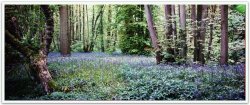
I pretty much always scout and plan images when I'm intending to use my 7x17" ULF view camera. It's a bulky and heavy setup so lugging it around hoping for suitable compositions is not practical. I use an app call Cadrage Directors Viewfinder to visualise and plan. Like other apps you can set the film/sensor size and focal lengths and it gives a pretty reasonable sense of the composition.

IMG_5709.JPG
Cadrage preview


Bluebells-Small.jpg
7x17" ULF Trichrome using Ilford HP5
 
Last edited:
I've been using my Micro 4/3 digital camera as a viewfinder to check the location before setting the tripod. The zoom lens allows me to figure out which 4x5 lens I want to use. I've been using it as a lightmeter and note-taker as well.
 
I'm planning to take some photographs in small hamlet near my home. It's an investment in time and money to break out the 5x4 and do some work there, so I took a few digital photos the other day on a Sony HX99 just to get a flavour of the environment. When I return with the 5x4 and b/w film the final image will come from time under the darkcloth, but I will have an idea of what I am looking for. All notes are written down, with a pen which you fill from a bottle. Old habits die hard! :)
 
I'm planning to take some photographs in small hamlet near my home. It's an investment in time and money to break out the 5x4 and do some work there, so I took a few digital photos the other day on a Sony HX99 just to get a flavour of the environment. When I return with the 5x4 and b/w film the final image will come from time under the darkcloth, but I will have an idea of what I am looking for. All notes are written down, with a pen which you fill from a bottle. Old habits die hard! :)
That's a great tool. As I mentioned I do similar things. I will use the video recording mode to shoot the view and "take exposure and other notes" verbally rather than stopping to write things down if I'm in a rush and the light is fading. I can transfer the notes to paper later.

Since I;m also using the digital camera as a light meter, I take stills so I can compare the readings later to the settings I used for the film shot as part of a learning experience of how to use my digital camera as a light meter.
 
Back
Top