Optically clear glass

soupdragon

Popular Poster
Registered User
Joined
Oct 17, 2023
Messages
432
Anyone know where in the uk optically clear and flat/parallel glass (or preferably Polycarbonate) can be obtained?

For those who scan film using an Epson flatbed scanner (particularly 8X10" format) the optimal distance for the film to be above the scanner glass is 3mm.
However, Epson do not make a film holders for formats above 4X5" which means the film has to be paced directly on the scanner glass. Clearly this must introduce a focus inaccuracy which at best is undesirable.

I'll take any suggestions regarding the supply of raw materials.
 
When scanning 8x10, you need to have the film direct onto the scanner bed and then switch to the correct scanner lens in the scanning software
 
With the Epson V850 scanner you do not have the option of choosing the lens to be used.
The lens is automatically selected according to media and scanning resolution.
To use the high resolution lens the resolution needs to be 3200 dpi or higher. This is not selectable using the scanner glass setting.

the only way to use the high resolution lens is to tell either Silverfast or Epson Scan that you have fitted a film holder.

In my understanding of the software instructions.
 
Last edited:
the only way to use the high resolution lens is to tell either Silverfast or Epson Scan that you have fitted a film holder.
I think this is the same on all the Epson scanners, certainly on my old 4990. But if you tell it you're scanning with a film holder in place I don't think it'll do 10x8".

Ignoring the 10x8" issue, if you want to make a film holder for a format you don't have a holder for you then don't need any special glass, any normal picture framing glass is fine because you need to tape the film to the underside of the glass (which you shim to sit roughly 3mm off the scanner bed) so it's not scanning through the additional glass. The glass sits between the lightsource and the film, not between the film and the sensor. On mine I used some non reflective stuff from the framers which prevents any newtons rings. Obviously you can also wet mount too this way.
 
On my Epson V700 you choose between
Film With Holder
and
Film with Area Guide.

If you choose "Film With Area Guide" the scanner knows that the film will be sitting on the glass, and not raised above it in a holder. So it chooses the appropriate lens.
 
On my Epson V700 you choose between
Film With Holder
and
Film with Area Guide.

If you choose "Film With Area Guide" the scanner knows that the film will be sitting on the glass, and not raised above it in a holder. So it chooses the appropriate lens.
Yes, and if I remember right with the film holder higher res lens you are limited to about a 5 or 6” wide strip, not the full scanner bed - hence why they give you the “film area guide” for scanning 10x8” on the bed directly in the first place. The higher res film holder setting can’t be used for 10x8” unless you’re willing to rig some means of scanning the neg in strips then stitching it.
 
With the Epson V850 scanner you do not have the option of choosing the lens to be used.
The lens is automatically selected according to media and scanning resolution.
To use the high resolution lens the resolution needs to be 3200 dpi or higher. This is not selectable using the scanner glass setting.

the only way to use the high resolution lens is to tell either Silverfast or Epson Scan that you have fitted a film holder.
Why would you want to scan a 10x8 at 3200 ppi
 
With the Epson V850 scanner you do not have the option of choosing the lens to be used.
The lens is automatically selected according to media and scanning resolution.
To use the high resolution lens the resolution needs to be 3200 dpi or higher. This is not selectable using the scanner glass setting.

the only way to use the high resolution lens is to tell either Silverfast or Epson Scan that you have fitted a film holder.
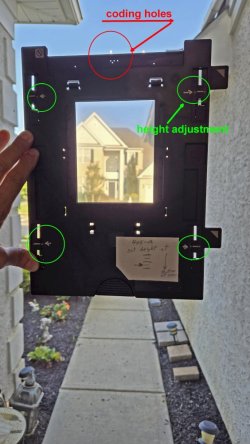
That bolded is incorrect. The scanner automatically selects the better lens when you use one of their film holders. It doens't matter what resolution you select. Each holder has coding holes that tell the machine two things 1. That you;re using a holder and therefore the better lens is automatically selected and factory focused at 3mm. 2. Which holder type you are using: (ie 35mm film strip, 35 slides, 120 mdium format, or 4x5.)

When you scan 8x10, you place it on the glass and the scanner automatically selects the less accurate platen lens used for 8x10 film or for print scanning that you place on the glass. This lens is focused for the glass, not 3mm above it.

Note that each film holder can be adjusted to raise or lower its height from the nominally factory focus of 3mm height. You should verify the focus the first time you use each holder.

See the photo below for the height adjustment sliders and the coding holes for a typical holder.
 

Attachments

  • 4x5 film holder for V850 adj 1920.jpg
    4x5 film holder for V850 adj 1920.jpg
    94.7 KB · Views: 7
Most Epson VX series scanners max out at around 2400ppi so even if you could choose 3200, apart from a larger file size, you are unlikly goiing to see and increase in sharpness.

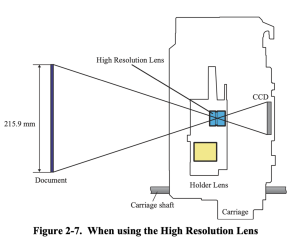
Just remember that the High Resolution Lens has a limited scan width which might not be enough to cover the entire width of 8 x10, it also requires the film to be suspended above the glass about 3mm.

I choose the scanner glass route for all my 5x4 negatives as I find I get a much cleaner scan than I do trying to suspend them above the glass.
epson-v-scanner-lens.png
 
The Epsons, 4990 and v7/8x series all use a thin mask type “holder” for 8x10 , it often gets lost as it’s a fragile plastic film outline of an 8x10 sheet , afaik every type of holder has a code read by the scanner to identify it, the lower resolution is fine for 8x10 as the effective enlargement post scanning takes care of scale , there is plenty of info out there about these very useful scanners.
 
I found the 10x8 film guide a bit flimsy and unreliable, so I made a more robust L-shaped guide that fitted in one corner only. Seemed to work. I don’t do much 10x8 now so I mostly use Epson’s wet scanning device with a piece of AN glass to hold the negs flat. Dry, not wet, which terrifies me. It will hold two 5x4 negs comfortably and I’ve made a mask to hold them in place.
 
When scanning 8x10, you need to have the film direct onto the scanner bed and then switch to the correct scanner lens in the scanning software
Are you experienced In this?
If so, can you tell me how I select the correct lens using either Epson Scan or Silverfast 9 software?
 
Yes, and if I remember right with the film holder higher res lens you are limited to about a 5 or 6” wide strip, not the full scanner bed - hence why they give you the “film area guide” for scanning 10x8” on the bed directly in the first place. The higher res film holder setting can’t be used for 10x8” unless you’re willing to rig some means of scanning the neg in strips then stitching it.
That's disappointing news.
My goal was to scan 8X10 using the high resolution lens.
This is why I was hoping to raise the film 3mm above the scanner glass and and use the appropriate software option for maximum resolution.
 
Why would you want to scan a 10x8 at 3200 ppi
Because I can get the same if not better definition using 4X5 film fluid mounted.
It appears my 8X10 camera is now obsolete with the only possible exception being to buy an eye wateringly expensive drum scanner.
 
That bolded is incorrect. The scanner automatically selects the better lens when you use one of their film holders. It doens't matter what resolution you select. Each holder has coding holes that tell the machine two things 1. That you;re using a holder and therefore the better lens is automatically selected and factory focused at 3mm. 2. Which holder type you are using: (ie 35mm film strip, 35 slides, 120 mdium format, or 4x5.)

When you scan 8x10, you place it on the glass and the scanner automatically selects the less accurate platen lens used for 8x10 film or for print scanning that you place on the glass. This lens is focused for the glass, not 3mm above it.

Note that each film holder can be adjusted to raise or lower its height from the nominally factory focus of 3mm height. You should verify the focus the first time you use each holder.

See the photo below for the height adjustment sliders and the coding holes for a typical holder.
I think I kind of said that.
But thanks anyway.
 
Most Epson VX series scanners max out at around 2400ppi so even if you could choose 3200, apart from a larger file size, you are unlikly goiing to see and increase in sharpness.

Just remember that the High Resolution Lens has a limited scan width which might not be enough to cover the entire width of 8 x10, it also requires the film to be suspended above the glass about 3mm.

I choose the scanner glass route for all my 5x4 negatives as I find I get a much cleaner scan than I do trying to suspend them above the glass.
View attachment 5376
Once again, where did you find that info?
I am so rubbish at the internet.
 
Are you experienced In this?
If so, can you tell me how I select the correct lens using either Epson Scan or Silverfast 9 software?
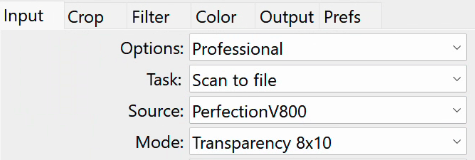
in VueScan choose Transparency 8x10

vuescan-10x8.png

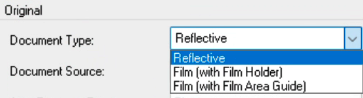
In Epson Scan choose Film With Area Guide

epson scan.png
 
I found the 10x8 film guide a bit flimsy and unreliable, so I made a more robust L-shaped guide that fitted in one corner only. Seemed to work. I don’t do much 10x8 now so I mostly use Epson’s wet scanning device with a piece of AN glass to hold the negs flat. Dry, not wet, which terrifies me. It will hold two 5x4 negs comfortably and I’ve made a mask to hold them in place.
Any chance you could post a picture of your design plus a few dimension and materials used?
That could be a big help to me.
 
As a side issue, I think the amount of data the scanner software and possibly the computer in use may be a limiting factor.
I have no issues throwing more Money at a high end computer with whatever processor/memory/screen I need but I do want maximum resolution from my scanner.

Yes, I understand the the actual scanner dpi is most likely less than 3200 but I see no point in using a low resolution lens when a better one lives inside the enclosure.
 
Back
Top