Advice On This Negative

Ian-Barber

Admin
Registered User
Joined
Aug 6, 2016
Messages
1,706
I appreciate this might be the wrong section because the the problem I have may be scanning related but I will start it here and then move if a conclusion is found.

I also appreciate its a Large Format forum but just reaching out to a wider audience with more experience than I have

I have just developed a full roll of Kodak TRI-X 400 120 film, all of the same subject matter (corn fields) and to be honest, they are disappointing. When you look closer into the image, it starts to look well mushy to me.

This is not the first time they look like this and I am now starting to wonder if its something I am doing wrong in the development stage.

I know its not the camera because I had the same issues with my other camera. It could be the inferior quality of the scanner (Epson V800) and that also lies in the back of my mind but I ho have a fair understanding on scanners and how to use them.

Development Process:
Kodak HC110 diluted at 1:63 (9ml of developer and 591ml of water) to make up 600ml
Development time 11 1/2 minutes @ 20° C
Paterson Development Tank

Inverted the tank for first 20 seconds and then did 3 inversions every minute. Inversions were 90° turn and twist and back again.

Let me mention the developer for a minute. This Kodak HC110 is about 4 years old now and was given to me when I first wanted to try film. The bottle was about 1/2 full when I got it. I now HC110 has a long life shelf but I am wondering if its time to buy a fresh bottle.

Stop Bath: 1 Minute using Ilford Stop Bath
Fixer: 5 Minutes using Ilford Rapid Fix
Wash: 5 Minutes

Scanned: Epson V800 with Silverfast and minimal settings in the scanner software

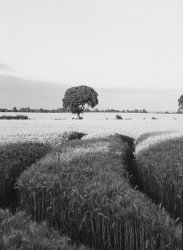
The Scanned Image:
Corn-Field-And-Tree.jpg

The area across the middle where the sun was sweeping across the field just looks lifeless and mushy to me.

I spot metered in the darkest near foreground tracks between the corn and then set the exposure to be 2 stops below the metered reading to place this area on Zone 3. The bright corn and sky was about 5 stops brighter.

I have uploaded the full scan which was done at 3200ppi if anyone wants to see the full size image
Download full scan here
https://ln.sync.com/dl/407904e80#3rht2c95-uchpuj99-q9v7im2m-k9h76a36


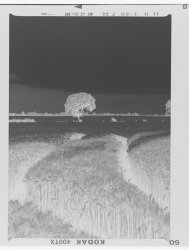
Here is a look at what the negative looks like
corn-filed-negative.jpg

From what you can see, does this look normal or can you see anything that jumps out at you.
 
Last edited:
I don't see anything wrong Ian. There is a lot of texture in the area which just needs a little more teasing out but with brightly lit and hairy corn heads, probably moving slightly too, together with the film grain you cannot hope to resolve much detail there imho.
 
Hi Ian,

That neg looks fine to me. I would suspect the scanner software. I've used various versions of Silverfast since 2000 and have always found it difficult to get a good, full scale scan from a B&W neg; Silverfast always seems to want to add too much contrast. Have you tried other scanning software? Vuescan? Epson Scan that came with the scanner? I would start there.

FWIW, nowadays I still use Silverfast Ai Studio for all my scanning, but when working with B&W I scan to a raw linear file, and then use ColorPerfect to convert the raw file. But, you may not wish to get that deep into it unless scanning B&W is/will be a regular thing for you.

Hope this helps.
 
I could be entirely wrong here but it could be a lighting problem -nothing to do with how the film was exposed, developed or scanned. If the sun was quite high in the sky, shining down onto the corn, the corn would lack contrast, even though the sun was actually shining on it. If the sun was lower in the sky, the light would rake across, producing more contrast.
Where was the sun when the picture was taken?

Alan
 
The sun was shining from the upper left of the image, it was not noon height but again it was not at it lowest. You have a valid point about the sun raking across the corn if it was lower in the sky
 
Thanks Alan. Do you have any thoughts on the HC110 been 4 years old.

HC110 concentrate does last quite a long time, but since you don't mention how the bottle was stored, if at room temp I'd say it's pushing it at 4 years. I know the price of HC110 has gone up quite a bit, but if it's a developer you're planning on using regularly I'd just buy a new bottle. Store it properly--cool, low-light, etc--and it will last 4 years. I store mine in full glass bottles with plastic wrap over the spout and those should last 4 years; though I typically use it up before then! :)

Alan C. presents a good point, but given the curve shape of Tri-X I would have thought it could easily handle the lighting conditions you have in that photo. Bruce Barnbaum, who also uses Tri-X, generally places important shadow detail into Zone IV letting the high values push further up the curve because he knows that the film can handle the high end.
 
I assume the sky was blue when you took the picture. Under a blue sky what shadows were present in the corn -which you need to produce the texture and contrast -would be bluish in colour. They would come out darker in the picture, and be more pronounced, if you had used an orange filter.
Go on; now tell me you did use an orange filter!

Alan
 
Alan, if there is no texture visible in the subject, then it won't appear on the film, no matter what film or exposure regime you use.

Alan
 
Alan, I agree with you about TriX. It is a nice user-friendly low-contrast film with easily controlled highlights.
Alan
 
Yes it was a blue sky with a strip of non distinct cloud.

I never used a filter, in fact I get confused about them to be honest.

The HC110 is stored at room temperature which is something I was concerned about. When you say you store your in a cool environment, are you talking refrigerated.
 
It is hard to say since we are looking at a scan, but have you looked at the negative with a good loupe? There may be subject movement. Grain fields tend to sway and have the ears bob up and down. What was your EI? Looking at the negative (again a scan), I'm inclined to think you may need a little more exposure (lower EI) and a reduction in development.

If I was wet printing this would be a good case for selenium toner to punch up the blacks - there are lots of fine shadows in the grain you cannot reach any other way.
 
The HC110 is stored at room temperature which is something I was concerned about. When you say you store your in a cool environment, are you talking refrigerated.

Yes, I store most of my photo chemistry in a small fridge with control set to maintain about 10C; storing at room temp is really not an option for me due to rather warm indoor ambient temps for a large part of the year. For example, just read a note, yesterday, that we've had 30 days of >43C already this year!
 
For example, just read a note, yesterday, that we've had 30 days of >43C already this year!

Not sure if i could cope with that heat all the time. I did experience it once when I went into Arizona though, I say went into Arizona, I was actually the other side of the state line when I visited the Hoover Dam
 
At the risk of asking the obvious, you say that you used minimal settings when scanning. I assume that that would include sharpening, which is always necessary when we enter the world of analogue to digital. So, did you apply any sharpening to the image (which would, by definition) improve the sharpness?

I've just had a play with the image using the small number of Photoshop commands in my repertoire, and it can be improved. I gained the impression - no more than that, given the small size of the image - that you focused on the foreground and the middle distance and beyond is out of focus. The image is breaking up when I try to look closer, but it seems to my eyes that neither subject movement nor camera shake are involved in the foreground.

If developer is past its "throw by" date I'd expect it to be revealed by inadequate (or no) development (some developers are binary like that), not by a lack of sharpness. I'm not sure off hand which developer category HC110 is, but if it's a solvent developer, possibly extra solvent action at the expense of the developing agent might explain additional softness - but I'd be clutching at more straws than are in your photograph to offer it as a likely or even reasonable explanation.
 
Yep, that's where I live...right in the heart of the Sonoran Desert in Arizona. I guess I'm a man of extremes! The place I moved from had extreme winter; we once went the entire month of January where the temp never rose above -18C, except for 3 days (not consecutive) where we had a "heat wave" of about -17C to -16C! I, also, remember the summer when it snowed!!
 
I focused just at the edge of the track marks which is about 1/3 into the frame.

For the scanner settings, the only adjustment was 40% sharpening.

I am assuming you have downloaded the large tiff file Stephen
 
OK. I've never used HC110, but looking it up I have a question. You give the dilution as 9 + 591 (which I make about 1:65 by the way) but don't say if that's 9cc of concentrate or stock solution. It also appears that US and UK versions are slightly different, so which was it?

Looking at the large tiff and comparing it with my scans, I'm coming to the conclusion that in part the problem may be the developer. I've found that HC110 is a non-solvent developer (and you'll pick up from this that my exposure to different developers is limited, very limited) which should imply a certain degree of acutance effect in the negative. I've compared some of my 120 negatives which I farmed out to a pro lab for developing (large number back from holiday, so saved me work) and my own 5x4s developed in Rodinal. The 120 negatives were developed in D76, and are very visibly less sharp.

Acutance effects depend on the amount of agitation and the concentration of the developer (with at least some developers). This is a possible explanation, and if you'd like me to put a couple of scans up for you to examine, I'm happy to do so.

The middle areas have the appearance to me of being too light, suggesting either overexposure or overdevelopment, but I'm not going to insist on this, and may be completely wrong. At any event, they resemble the effect I remember getting on some very overexposed negatives when I attempted to make darkroom prints. If I had to stick my neck out - and I'm definitely doing it here - I'd ask if you had overdeveloped and slightly overexposed.

I fully expect to be shot down over this one!
 
Back
Top