

-
Thank You For Visiting... Please Click Here and sign up to contribute and reply to posts and download the resources.
You are using an out of date browser. It may not display this or other websites correctly.
You should upgrade or use an alternative browser.
You should upgrade or use an alternative browser.
Darkroom control program
- Thread starter measwel
- Start date
- Joined
- Aug 29, 2020
- Messages
- 1,339
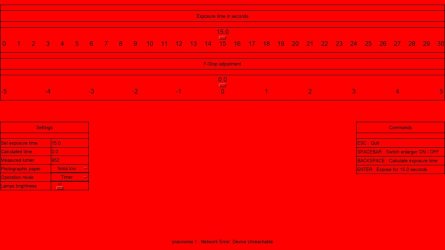
Well, I made the background color configurable as well. This is what it looks like when the background is red:
View attachment 4802
I am pretty sure the lightbleed from the backlight would be too much for the darkroom.
Remember, it's much easier for me to sit in the corner and give you design notes than actually do the work myself
 But ... for my tastes anyway, I liked the original red on black scheme much more for the darkroom. It just needed the characters and borders to be bigger/thicker/more pronounced than the original itnerface had it.
The character size is no problem. It can be adjusted in the settings file. But the borders are. It took a lot of tweaking and padding to get them like they are now. I cannot control them by a single setting the config file alas.
Hi,
I have uploaded a new version of the program, which should work without any smart devices set up. So the user can try it out. The only condition is to have python on the computer and import the needed dependencies as explained in the README.

 github.com
I have uploaded a new version of the program, which should work without any smart devices set up. So the user can try it out. The only condition is to have python on the computer and import the needed dependencies as explained in the README.
GitHub - measwel/darkroom: A PHP application for photographic darkroom work
A PHP application for photographic darkroom work. Contribute to measwel/darkroom development by creating an account on GitHub.
github.com
I got the light intensity sensor today. Some suprising results.
Good: it works.
Strange: with a opal light bulb the measurement is linear. Changing 1 stop on the lens halves the measured lux value. I also tried a LED bulb. In this case the measured values did not quite get halved, but it was close enough to be practical I guess.
Interesting: a cold white light gives more measured lux than a warm white light at the same brightness setting.
Bad: the sensitivity of the sensor is on the low side. The scale goes from 0 to 1000. With an average setting on my enlarger (20 x 20 cm print, F5.6) I am getting a reading of 16 lux. Making a big print or closing down the lens to F22 will bring the measured value to 0 lux.
Conclusion; it is sensible to use the strongest bulb feasible in the enlarger head. I will try with the stongest LED bulb I can find.
Good: it works
. Strange: with a opal light bulb the measurement is linear. Changing 1 stop on the lens halves the measured lux value. I also tried a LED bulb. In this case the measured values did not quite get halved, but it was close enough to be practical I guess.
Interesting: a cold white light gives more measured lux than a warm white light at the same brightness setting.
Bad: the sensitivity of the sensor is on the low side. The scale goes from 0 to 1000. With an average setting on my enlarger (20 x 20 cm print, F5.6) I am getting a reading of 16 lux. Making a big print or closing down the lens to F22 will bring the measured value to 0 lux.
Conclusion; it is sensible to use the strongest bulb feasible in the enlarger head. I will try with the stongest LED bulb I can find.
- Joined
- Aug 9, 2016
- Messages
- 838
What is important is that you use a bulb of the correct colour temperature. Multigrade filters won't work properly with a cold light. It should be a warm light, about 2700K.
- Joined
- Aug 9, 2016
- Messages
- 838
I read exactly the opposite. Namely, that warm light will produce too little contrast, while around 4000K should be optimal.
You may have read the opposite. But I have done the practical tests, with enlarger light of different Kelvin ratings. And there is no doubt. To get multigrade filters to work as they were intended from grade 0 to 5, you need a light of about 2700 Kelvins.
- Joined
- Aug 29, 2020
- Messages
- 1,339
You may have read the opposite. But I have done the practical tests, with enlarger light of different Kelvin ratings. And there is no doubt. To get multigrade filters to work as they were intended from grade 0 to 5, you need a light of about 2700 Kelvins.
That sounds right. The filters were designed to be used with incandescent lights with end up being right at 2700K.
@measwel I think you may be conflating two things here. The filters are designed for a 2700K light source. But they change the effective color reaching the paper. Say you were building an actual VC light source - that is, a VC head that requires no external filtration - that light source has to be able to generate light on a wide range of color temps from 2700-4000K (or more). But the filters do this for you by taking the output of the incandescent bulb and filtering it to produce bluer and bluer light hitting the paper across the range of filter grades.
VC paper is sensitive to the blue-green portion of the spectrum, and the light source has to produce both. The more green you dial in, the softer (lower) the contrast. The more blue present, the harder (higher) the contrast. When both are roughly equal, you get a nominal Grade 2 paper. This is all approximate because different papers have somewhat different spectral response and you have to test for yourself what proportion of green to blue will give you the contrast grade you want. (I avoid this entirely by split VC printing everything but that's another matter all together.)
@thronobulax, @Alan Clark thank you both for the valuable comments. Since I already ordered the 4000K bulb, I guess I am off to find a similar one giving off 2700K. I do not own a color head, so I will be stuck with my Durst M601 and some Ilford filters.
Be careful! The bulb I mentioned is not standard size. I first noticed it when I got it. It is a BIG bulb of 16 cm long. I need to find a regular sized one yet.
Be careful! The bulb I mentioned is not standard size. I first noticed it when I got it. It is a BIG bulb of 16 cm long. I need to find a regular sized one yet.
Last edited:
The application works quite well now, so I packed it into an .EXE and made a first public release. Anyone interested can try it out, either by running the python script or by simply running the EXE.
github.com
GitHub - measwel/darkroom: A PHP application for photographic darkroom work
A PHP application for photographic darkroom work. Contribute to measwel/darkroom development by creating an account on GitHub.
github.com
After some searching, I settled for the LEDVANCE E27 retrofit 17W, 2700K, 2500 lumen LED bulb. It has a real opalized glass housing and the length is 118 mm. In my enlarger, any bulb bigger than 12 cm will not fit. Once I get it, I will write how it works in the enlarger.