Fountains Abbey North Yorkshire

Ian-Barber

Admin
Registered User
Joined
Aug 6, 2016
Messages
1,714
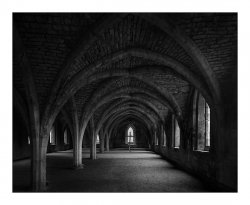
Fountains Abbey Cellar.
The subject brightness range of this scene was 8 stops from the darkest part to the brightest part through the window behind the cross. Placing the low values on Zone 3 put the high values up on Zone 11. I decided to develop to N-3 using the Steve Sherman EMA times with FP4 film. Wet Scanned on Epson v800.
Fountains-Abbey-Cellar.jpg

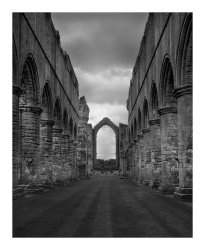
Fountains Abbey Window
I had to wait until later on in the afternoon to make this exposure by which time the weather had changed.

The subject brightness range was 5 stops so I gave this an N development in Pyrocat at 1+1+100. Wet Scanned on Epson v800.
Fountains Abbey Window.jpg
Fountains-Abbey-Cellar.jpg Fountains Abbey Window.jpg
 
Well done, Ian!
Great shadow detail.
I love the Cellarium.
When we visited Fountains Abbey years ago there was no cross ... or did I miss it?
 
Last edited:
Excellent images, Ian.
Perhaps there's enough grass in the foreground of the nave?
When I was there a while ago, it was much more densely populated.
Do you find wet-scanning to be an improvement? I keep thinking of it, but Epson's little plastic picture frame is quite expensive.
 
Do you find wet-scanning to be an improvement? I keep thinking of it, but Epson's little plastic picture frame is quite expensive.

For wet scanning, I use a piece of 3mm picture framing glass which I had cut to just over 10x8. I also got the edges polished just to remove the sharp bits. To prevent it from marking the scanner platter, although it shouldn't due to its polished edges, I put a strip of black tape around the edge.

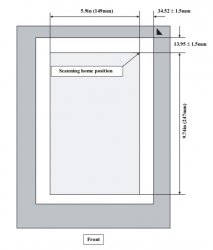
The negative is then placed emission side down, fluid on top followed by a piece of acetate. Because its 5x4, use Film With Film Holder setting in the scanner software and make sure the negative is in the middle of the scanner glass.

I always seem to get cleaner scans from wet scanning, hardly any dust at all and better edge to edge sharpness. I only wet scan the ones I am going to print.
 
So this isn't using the Epson device?
As I understand it, the glass with its tape border is placed on the scanner glass and the negative is on top, with fluid under and over and the clear acetate on top of that. Presumably this gives the correct distance for accurate focus with the Film Holder setting. I had no idea. Very clever. Might have give it a go.
 
So this isn't using the Epson device?

No, its just a piece of glass I got cut at a local picture framers. I did buy a piece of anti-reflective glass to hold back and newton rings. The piece of glass cost me £3 and an extra £1 to have the edges polished.

I chose 3mm glass because at this height, most V series Epson perform the best. If doing any smaller than MF then you may have to test the height but for MF and 5x4 3mmm is the optimal I have found.

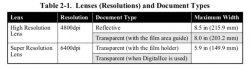
My Scanner ( Epson V series) uses two lens and they are selected by which option you choose in the scanning software

1.jpg

As I am only scanning 5x4, I choose to use the Super High Resolution Lens which allows me to scan at 6400 which in turn gives me a true (2600 dpi) on the horizontal scan axis. The optimal position to get this is to have the film placed within the area shown below. This is why I place the film in the centre.

I have also tried masking the outside edges off with black card to prevent light scatter but my V800 uses LED's for the light source and I have never seen any difference using the mask so I no longer use it.
2.jpg
 
I love the first one. You've certainly nailed the dynamic range. I've done the same shot in colour, waiting until the light outside was sufficiently close to fit in the range of the Astia film I was using
 
I have the same scanner. What fluid are you using?
 
Absolutely LOVE the first image! If I may nit-pick one thing...sorry, I can't help myself when I look at my own or anyone else's photographs...if I were shooting this scene, I would have placed that cross square in the middle of the distant window such that the vertical line of the cross proceeded straight through the apex of that window. I hope you always take my comments as constructive in nature.
 
Ian, regarding scanning on an Epson V700, what DPI would you scan 35mm negatives at?

Alan
 
The Epson V series have an optimal resolution of about 2400 once you have found the optimal height that the negative is suspended above the scanner glass which in most cases is around 3mm. With interpolation, the only way to achieve 2400 is to scan at 3200 and above.

Yes, scanning at 3200 and above is going to give you a big file but you will have squeezed all the juice out of the negative and then it can be downsized.

Personally, I scan them at 4800 and then downsize the tif to 360ppi to match my printer resolution once it has scanned.
 
Thanks for that Ian.
By coincidence I have been scanning them at 4800, though I didn't really know why.

Alan
 
Back
Top