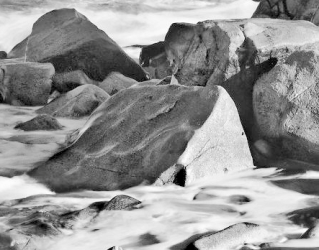
Rocky Shore - Plougrescant

I've just looked at the image on my PC in the house, then my Android tablet, and the dual screens here in my darkroom. While they are all very marginally different, there seems to be some blocking up of the lower mid-tones into the shadows. That's on all my screens
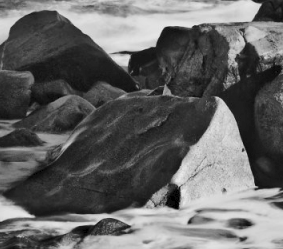
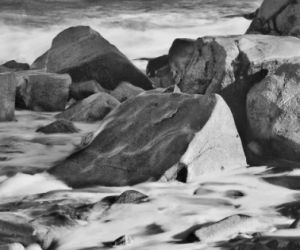
1751987990778.png1751987785123.png
or even

1751992037998.png

The contrast looks too high on my screen. And the shadows are full black with no detail.

That's my feeling as well. The slopping face of the rock is in clearly not in shadow. Some time ago I copied many exhibition prints with a DSLR and studio flash and had to correct for this effect.

Having visited Mobberely and seen the Ilford/Harman D&P facility I would imagine & expect the print quality is superb.

Ian
 
Last edited:
I wish I hadn't said anything now.
Well, don't be. I am just happy that folk are actually talking and contributing. On the plus side you may have found a problem with the contrast of your screen or not. It is a problem with forums like this. We all have our screens set up differently so we all see the images differently.
 
Well, don't be. I am just happy that folk are actually talking and contributing. On the plus side you may have found a problem with the contrast of your screen or not. It is a problem with forums like this. We all have our screens set up differently so we all see the images differently.
Quite.
 
I like this photograph very much. I think the "near-far" composition is very strong, very nicely seen.

This reminds me very much of Point Lobos here in California.

David
 
Thanks for all your comments everyone, it’s not over yet, I have realised I will have to re scan so that you can see a better quality image.
 
Works for me and looks good on my three screens.
 
I like it a lot Helen, contrast etc looks just about perfect to me FWIW
 
Seriously, I'm not criticising your production. it is great!

I may need to find some way of calibrating my monitor.
 
I may need to find some way of calibrating my monitor

I use the Calibrite Display plus. If you don't use such a device, you will never get it truly right.

Good luck with that..if you only have brightness and contrast!

But, with a calibration device and software, that's all you need. It's not the monitor you calibrate, it's the video driver in the computer
 
But, with a calibration device and software, that's all you need. It's not the monitor you calibrate, it's the video driver in the computer

Unfortunately, monitors also have their own adjustments for contrast, brightness, colour temperature, colour balance.

I bought a new Android tablet 2 or 3 weeks ago, I shot an image for a post here toady with my Canon DSLR and the image on the screen (no adjustments at all) alongside the object is remarkably close.

I'm not sure why different OS haven't more precise monitor consistency. I guess that’s the monitor manufacturers, the variety of video cards (now mostly onboard) and then the OS drivers.

Mobile devices like iPads,iPhones, and Android phones & tablets have remarkably good, well balanced, screens, for well over a decade. But then they have control over the video card, driver and monitor screen.

It is a bit of a minefield. I upgraded my darkroom PC to Windows 11 quite recently and the monitors are now way off, colour balance matches, it is colour saturation that's over the top, one slightly more than the other.

Ian
 
Unfortunately, monitors also have their own adjustments for contrast, brightness, colour temperature, colour balance

Some do, some don't. Either way, you never calibrate the monitor. You set it to average levels and leave it there. Then you use the calibration device and software to create an ICC profile, which will take care of the final adjustments. Once that profile is installed on your computer, you must never touch any of the monitor settings again.

… is remarkably close

But that is not calibration. That is just approximation.

I'm not sure why different OS haven't more precise monitor consistency

Because the whole video pipeline, including the video card in the computer, is what needs profiling, not the screen. And, in fact, Apple computers and monitors need much less attention because the component parts are built by a single manufacturer. But they still need calibrating with an external measuring device.

Mobile devices like iPads,iPhones, and Android phones & tablets have remarkably good, well balanced, screens

But they still need calibrating, especially if you plan on print matching.

It is a bit of a minefield. I upgraded my darkroom PC to Windows 11 quite recently and the monitors are now way off, colour balance matches, it is colour saturation that's over the top, one slightly more than the other.

I'm betting that is because you haven't calibrated the video pipeline.


I have been calibrating both my own, and others', monitors for something like 25 years and, on a multiple monitor setup, both monitors show the same colours, saturation and brightness. What is more, the prints I make are almost exactly the same appearance as the screen, because I also calibrate the printer driver, paper and inks to create an appropriate ICC profile for each variation.

Finally, when exporting for web or mail, you need to ensure that the image is soft proofed to sRGB, to best suit other folks' monitors, which may or may not be calibrated.
 
Some do, some don't. Either way, you never calibrate the monitor. You set it to average levels and leave it there. Then you use the calibration device and software to create an ICC profile, which will take care of the final adjustments. Once that profile is installed on your computer, you must never touch any of the monitor settings again.


But that is not calibration. That is just approximation.


Because the whole video pipeline, including the video card in the computer, is what needs profiling, not the screen. And, in fact, Apple computers and monitors need much less attention because the component parts are built by a single manufacturer. But they still need calibrating with an external measuring device.


But they still need calibrating, especially if you plan on print matching.


I'm betting that is because you haven't calibrated the video pipeline.


I have been calibrating both my own, and others', monitors for something like 25 years and, on a multiple monitor setup, both monitors show the same colours, saturation and brightness. What is more, the prints I make are almost exactly the same appearance as the screen, because I also calibrate the printer driver, paper and inks to create an appropriate ICC profile for each variation.

Finally, when exporting for web or mail, you need to ensure that the image is soft proofed to sRGB, to best suit other folks' monitors, which may or may not be calibrated.
What's sRGB?
I can guess at red green blue but s?
 
Well, don't be. I am just happy that folk are actually talking and contributing. On the plus side you may have found a problem with the contrast of your screen or not. It is a problem with forums like this. We all have our screens set up differently so we all see the images differently.
Also, as I have oft noted, it takes 100 photographers to change a lightbulb. 1 to do the work and 99 to talk about how they would have done it differently or better :)


The image is lovely on my phone, within the limits of what a phone can render. Then again, it could be the light here as I sit by the Ionian Sea...
 
Also, as I have oft noted, it takes 100 photographers to change a lightbulb. 1 to do the work and 99 to talk about how they would have done it differently or better :)
I like that. Yes, but everyone is talking and chipping in with their thoughts and ideas. Great !!
 
But they still need calibrating, especially if you plan on print matching.

It appears that many of the companies making and selling calibration tools rate the screen factory calibrations of mobiles, iPhone 6 onwards and later Android devices & iPads as being 99-100% correct in terms of lour space. That's at the factory default setting.

It is a bit of a minefield. I upgraded my darkroom PC to Windows 11 quite recently and the monitors are now way off, colour balance matches, it is colour saturation that's over the top, one slightly more than the other.

Ian

I'm betting that is because you haven't calibrated the video pipeline.

It's just a glitch in upgrading from Windows 10 to 11, without a fresh install, with 2 monitors, same model but not matched and different types of video input, DVI and VGA. This wasn't an issue with Windows 10 where the two monitors matched.

Instead of messing around, I've bought a pair of matched HP 23" monitors for my darkroom, these are backlit unlike my older monitors and also 16x9. Yes they will be calibrated, in the past I've used X-rite hardware & software, none of which is compatible or works with Windows 10 or 11.

Ian
 
Purely for comparison reasons (there is no critique here)
I copied your picture and tweaked it so it looked right on my monitor (2024 Apple 27" 5k)

Once again. I am NOT criticising your work.

my screen.jpg
 
Back
Top